


If you sell on Etsy, picking the right research tool can save you hours and boost your sales. In 2025, eRank vs EverBee lead the pack for keyword tracking and product discovery. This guide compares both, cutting through hype and hidden costs.
You’ll get fast, honest answers on which tool fits your shop, what each does best, and how to use them for real results. Whether you’re new to Etsy or leveling up, use this breakdown to make the smart choice and see growth you can measure.
My Quick Review: Which Tool Is Best for Etsy Sellers in 2025?
Go with EverBee if you want to spot winning products fast and see sales estimates right on Etsy. It’s best for new sellers, product researchers, and anyone short on time.
Choose eRank if your main goal is fixing SEO, tracking keywords, and making sure every listing gets seen. It’s a top pick for established shops, bulk optimizers, and anyone serious about ranking.
If you can afford both, stack them for a month. Use EverBee to test ideas and eRank to polish your listings. After 30 days, keep the one you open every week. This combo covers all the bases and puts you ahead of most Etsy sellers.
What Are eRank vs EverBee? (Overview & Core Use Cases)
Use eRank to track your rankings, spot keyword trends, and audit your shop’s health. Use EverBee to see which products sell, estimate monthly revenue, and get ideas without leaving Etsy. Each tool fits a different type of seller, but together, they cover the full cycle from idea to optimization.
eRank vs EverBee are two of the most popular Etsy tools in 2025. Both help sellers boost visibility, find what works, and cut wasted time. Their core difference: eRank is built for deep keyword research and SEO fixes; EverBee focuses on fast product research and in-browser sales data.
| Feature | eRank | EverBee |
|---|---|---|
| Platform | Web dashboard | Chrome extension, web app |
| Best for | SEO, keyword research, listing audits | Product research, sales estimates |
| Free plan | Yes (limits on daily searches) | Yes (limits on features, searches) |
| Paid plans (2025) | Pro $9.99/mo, Expert $29.99/mo | Growth $29.99/mo, Business $69/mo* |
| Data shown | Keywords, search trends, rank, audits | Sales estimates, revenue, trends |
| Key limitation | No sales overlay inside Etsy | Data is estimated, not exact |
| Who should use | Shops fixing SEO, optimizing listings | Sellers chasing new product ideas |
Annual discounts available; check each site for current pricing.
Resources:
See our full best Etsy SEO tools comparison for more research options.
Feature-by-Feature Comparison (with Data & Real Use)
eRank and EverBee feature by feature. You’ll see what each tool does, how it feels in daily use, and where the limits are so you don’t waste time or money.
Chrome Extension & Platform Experience
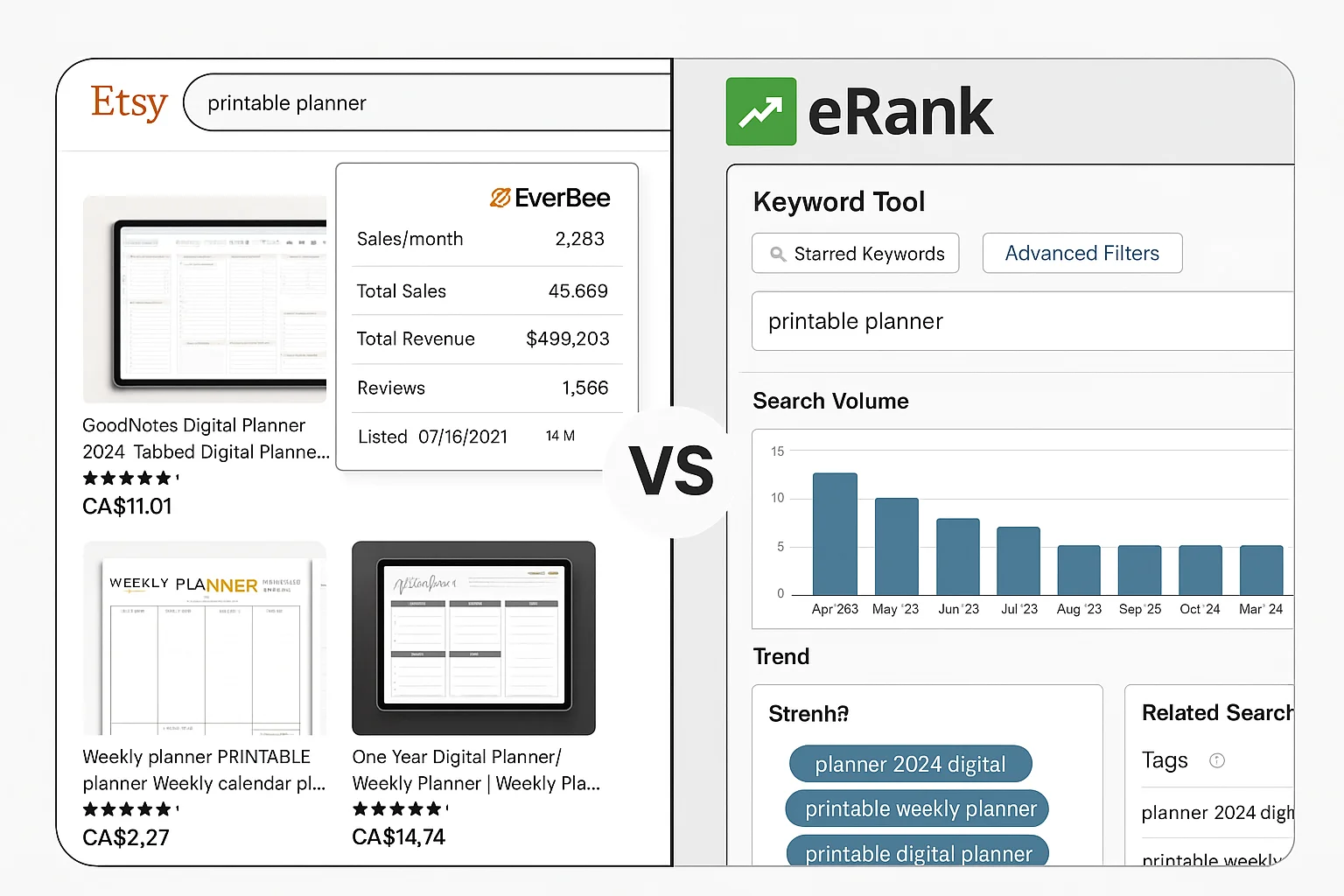
EverBee uses a Chrome extension that adds a research overlay right on Etsy search and product pages. You see sales estimates, reviews, and revenue for every product without leaving Etsy. Setup is quick: install, connect your shop, and browse. Most users find the interface simple and easy to navigate.
eRank is web-based, with no browser overlay. You work in their dashboard, searching for keywords, tracking trends, and running shop audits. It’s detailed and packed with features, but some new users need a few days to learn the flow.
Workflow example:
- EverBee: Open Etsy, search “printable planner,” hover over top listings. In seconds, see sales/month and revenue estimates for each product.
- eRank: Log in, enter a keyword, view search volume, trend history, and tag suggestions. Export results to optimize your next batch of listings.
EverBee’s overlay makes research fast, but all numbers are estimates, not pulled directly from Etsy’s backend.
Keyword Research & Trend Tracking
eRank shines for keyword research. The Keyword Tool gives search volume, competition, seasonality, and ranking trends. You can track keywords over time and get suggestions for tags that match what buyers are searching.
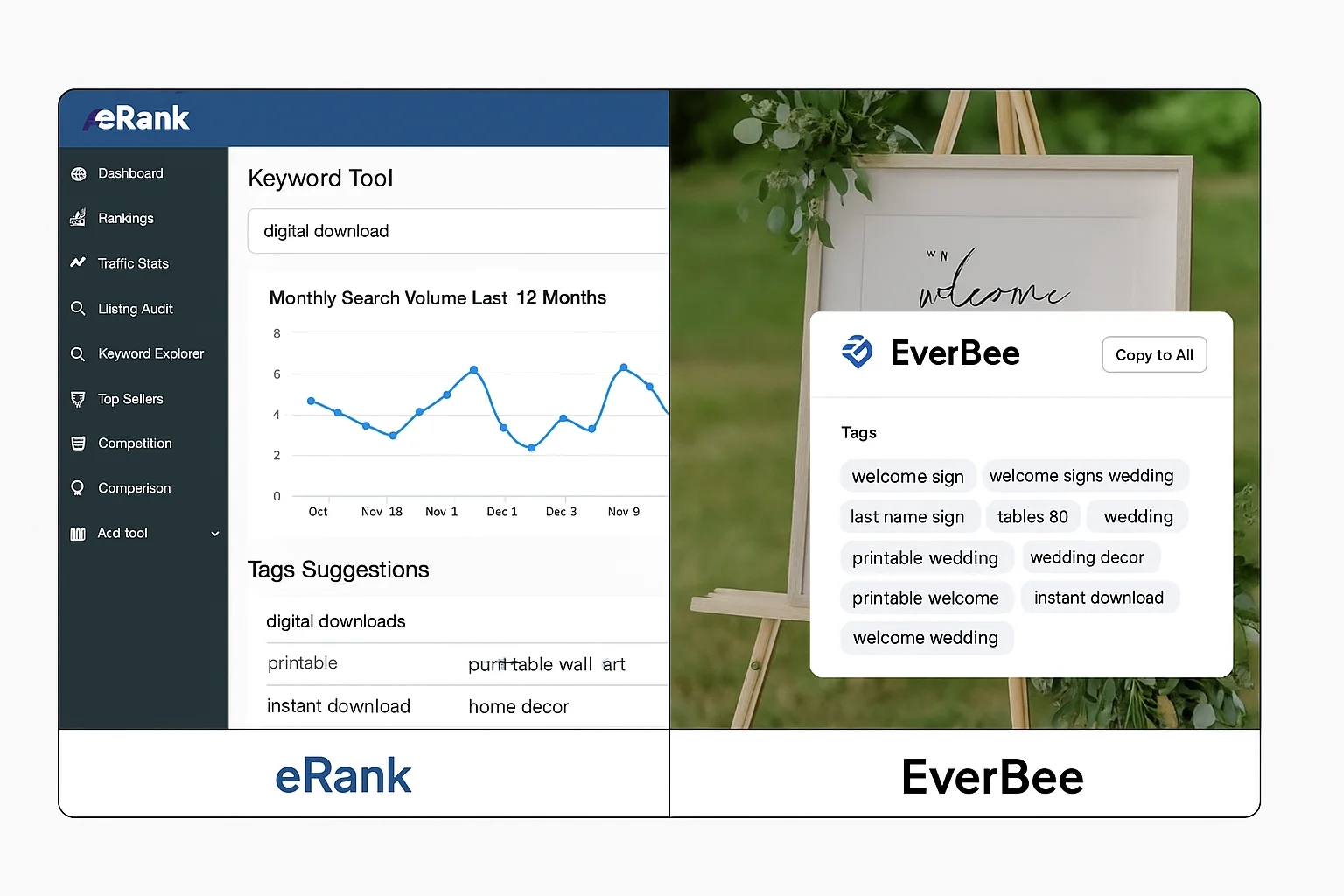
EverBee includes a keyword tool, but its main power is showing which keywords real products use and how well those listings perform. You can copy high-performing tags directly into your own listings.
Workflow example:
- eRank: Search “digital download,” track search volume for the last 12 months, and flag seasonal spikes.
- EverBee: Spot a hot keyword on a best-selling item and add it to your tag list.
Both tools use third-party data sources, so numbers may vary. Use them to spot trends, not as absolute truth.
Product Analytics & Sales Data Estimates
EverBee stands out here. It estimates sales and revenue for each product, making it easy to see which items move the most units each month. These estimates are based on observed data and trends, not on exact sales from Etsy.
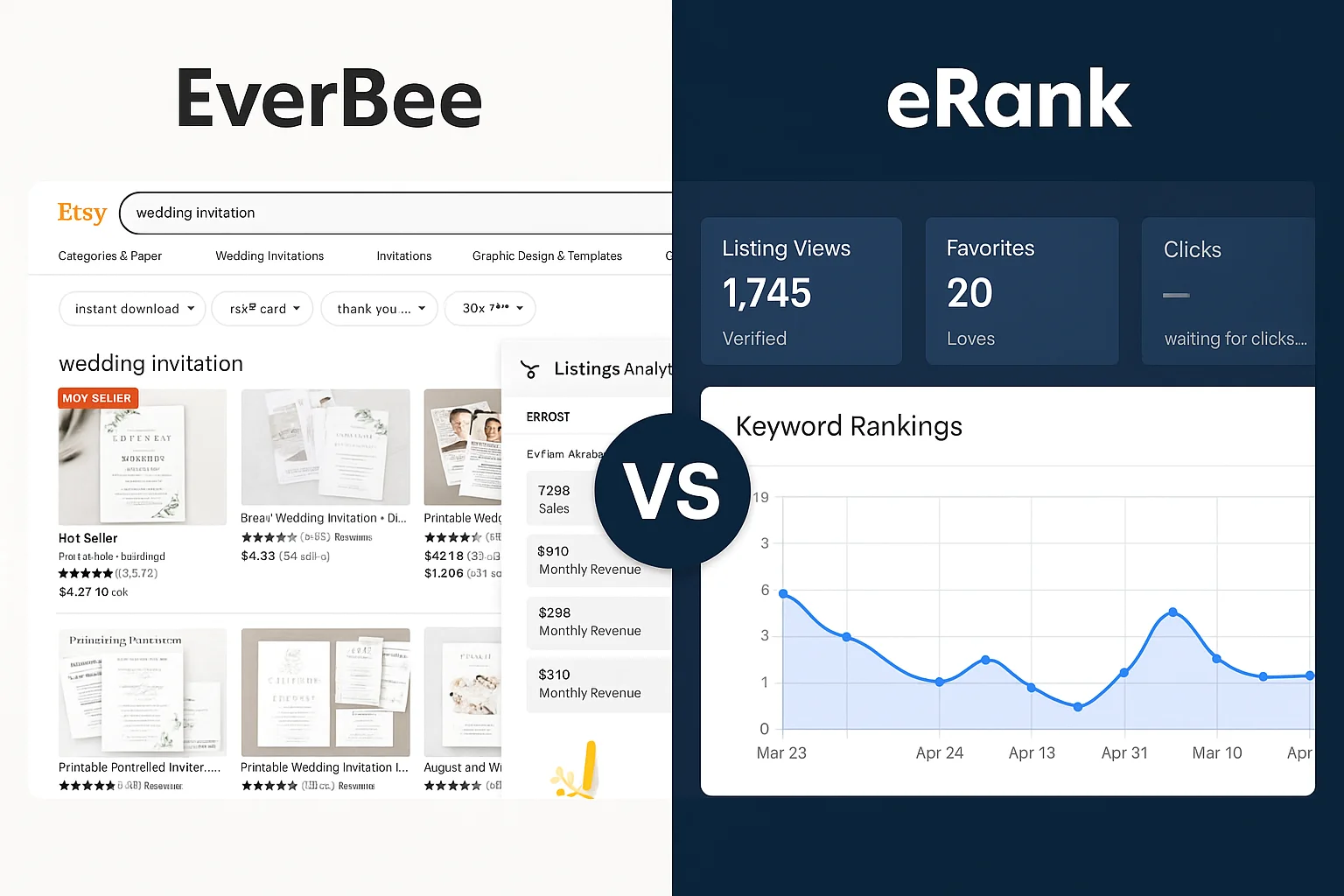
eRank focuses more on keywords and shop performance than on granular sales numbers for competitors’ products.
Workflow example:
- EverBee: Search “wedding invitation”, filter listings by highest estimated sales, and copy the product format or price point.
- eRank: Monitor your own listing views, favourites, and keyword position shifts after you update tags or titles.
EverBee’s numbers help compare products but don’t guarantee future sales. Always combine with your own shop data.
Competitor Analysis Tools
eRank offers full shop audits and lets you see which tags, titles, and keywords top sellers use. You can run side-by-side comparisons of shops or listings and get suggestions to improve your own.
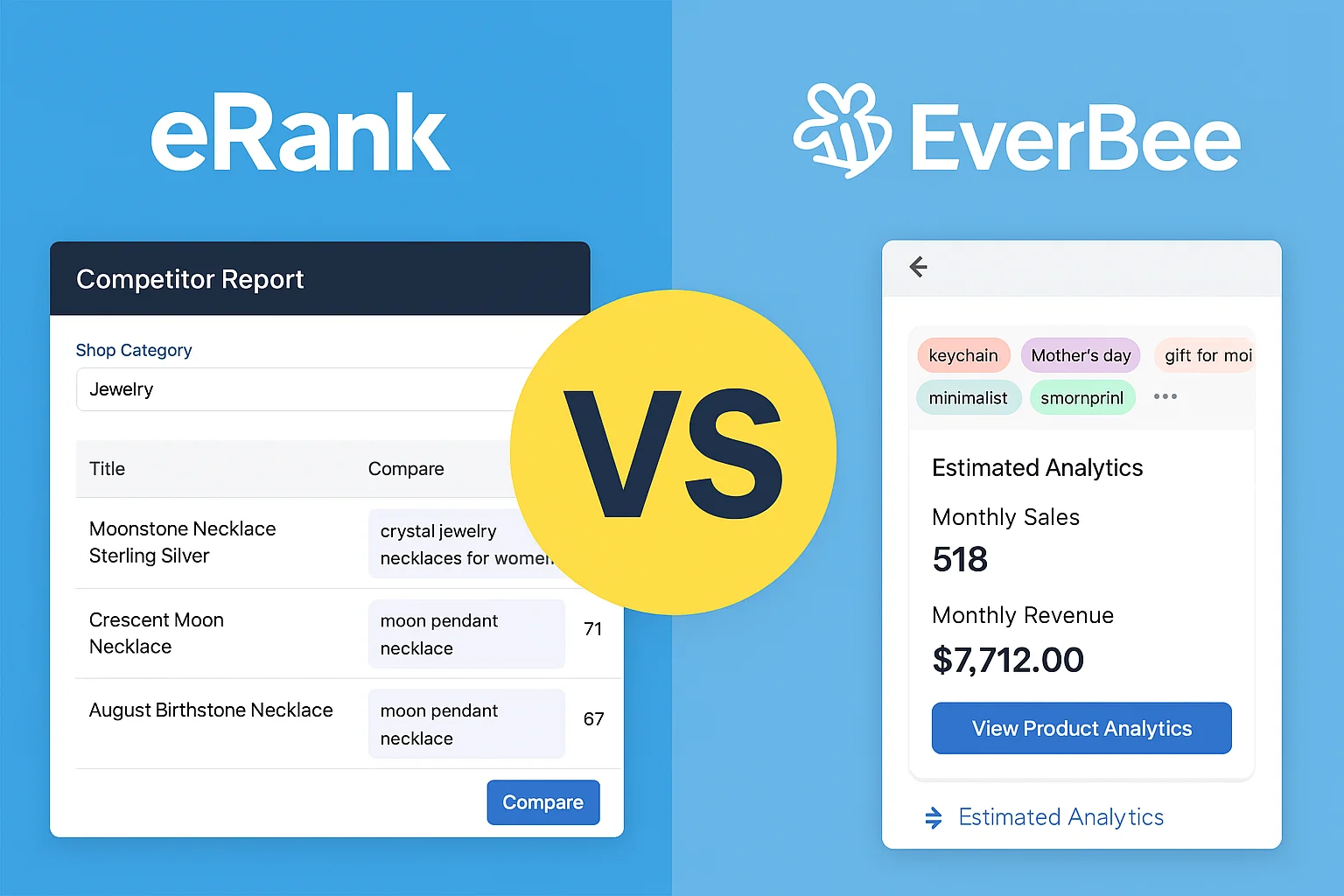
EverBee allows you to analyze a competitor’s product, see their estimated sales, and extract keyword and tag ideas right from the Etsy page.
Workflow example:
- eRank: Audit your main competitor’s shop. Export their top tags and compare with your own listings to find gaps.
- EverBee: Hover over a trending listing, review the tags and estimated sales, and adjust your shop’s strategy.
You can’t pull exact sales data for competitors; you only see what’s publicly visible plus estimates.
Listing & Tag Audits
eRank is built for shop maintenance. Its Health Check finds missing tags, weak titles, and poor image counts. It helps you batch-update listings for better search results.
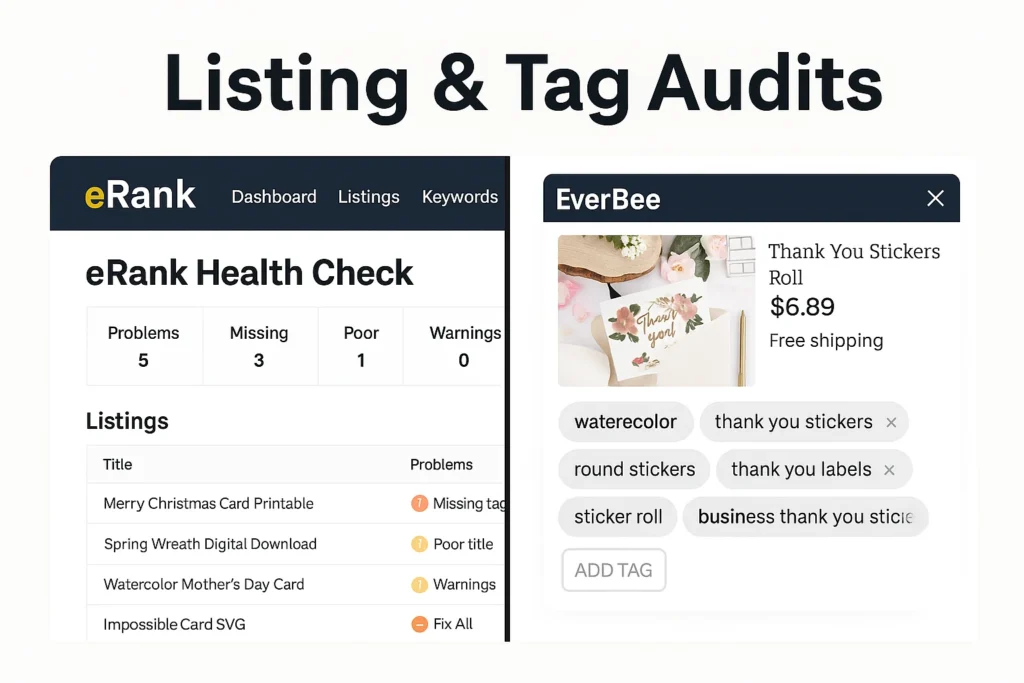
EverBee offers tag suggestions and highlights what successful products use, but it doesn’t scan your whole shop for issues.
Workflow example:
- eRank: Run a shop audit. Identify five listings missing tags and fix them in a batch session.
- EverBee: After spotting a strong keyword, update one listing’s tags for a quick test.
eRank is better for ongoing maintenance; EverBee is better for rapid-fire ideas.
Dashboard, Reporting & Integrations
eRank features a full dashboard, rank tracker, and detailed reporting. You can export data, set up weekly email reports, and monitor your keyword progress over time.
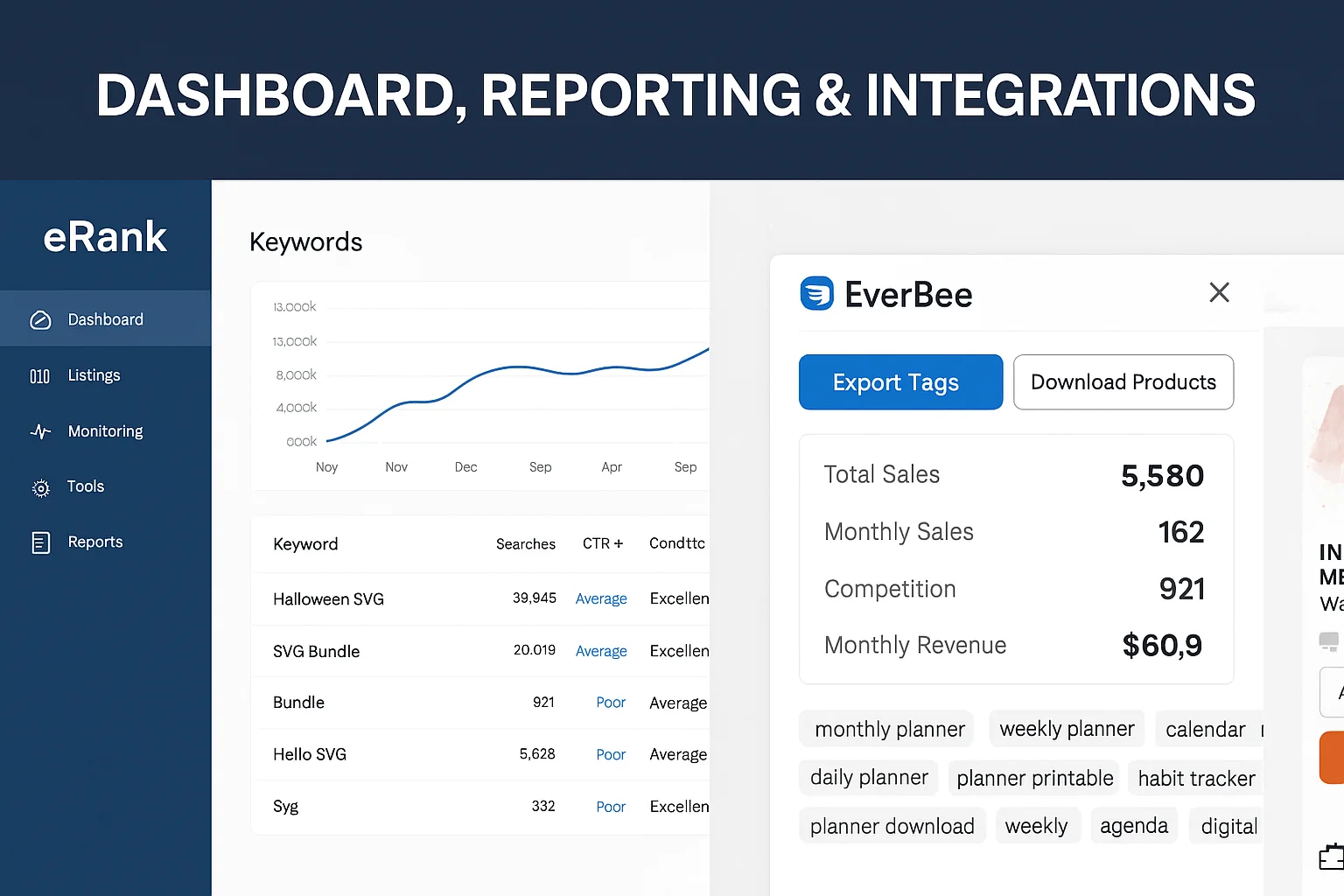
EverBee keeps its dashboard light, focusing on in-browser actions and simple exports. It’s not as deep for tracking long-term performance.
Workflow example:
- eRank: Export weekly ranking changes for your top 20 keywords and spot which listings need attention.
- EverBee: Download a list of winning products and tags to plan your next batch of listings.
Use eRank for big-picture shop tracking; use EverBee for daily product picks and ideas.
Ease of Use: Setup, UX, and Support
This section breaks down how easy it is to start with eRank and EverBee, from your first login to getting help when stuck.
User Interface & Onboarding
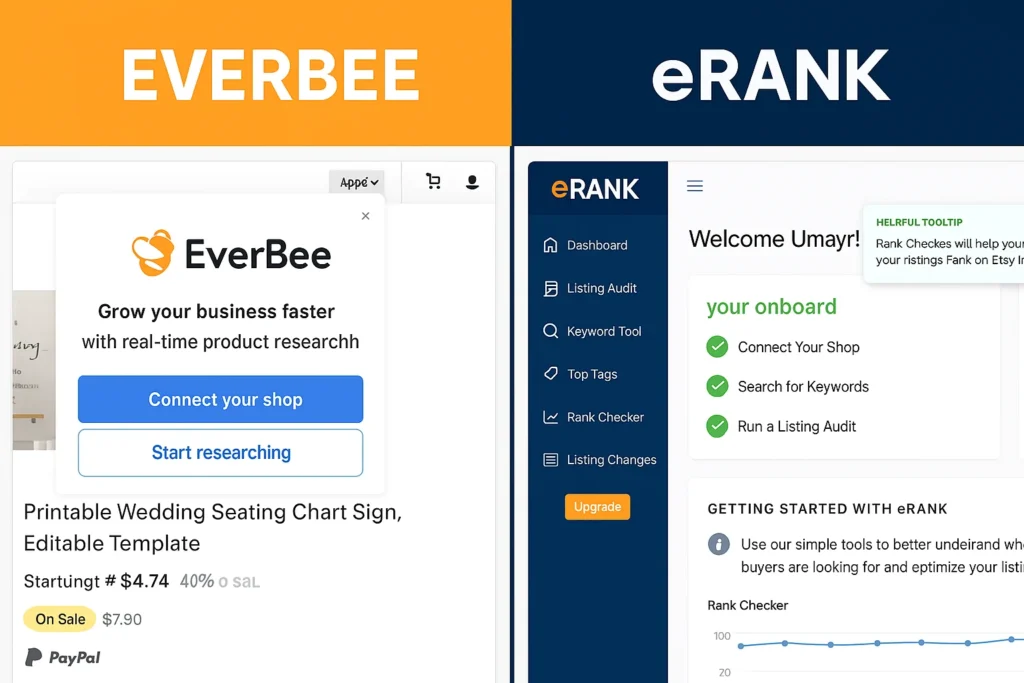
EverBee installs as a Chrome extension. In two clicks, you see product research overlays right inside Etsy. The layout is simple, with clear data on every listing. Most new users report being up and running in under five minutes. No tech background needed.
eRank runs as a web dashboard. Onboarding guides you to connect your shop, search keywords, and run audits. The dashboard packs more features, but takes a little longer to learn. Tooltips and step-by-step tips help you through each feature. A clean, color-coded layout keeps things clear, even for new users.
Connecting Your Etsy Account
EverBee asks you to connect your Etsy account if you want advanced analytics or to pull your own shop’s data. This takes a few seconds, with secure OAuth and no password sharing.
eRank also links directly to your Etsy account using Etsy’s official API. This allows automatic syncing of listings, shop stats, and ranking data. The connection is secure and doesn’t give eRank access to your private details or money.
Both tools use standard, safe integration methods. You can disconnect at any time in your Etsy account settings.
Customer Support & Community
EverBee offers chat and email support. Their help center covers common issues, and most questions get a reply in 24 hours. A user Facebook group gives tips, troubleshooting, and peer advice.
eRank provides email support, a detailed knowledge base, and active forums. Their YouTube channel features how-tos and troubleshooting walkthroughs. You can often find answers from other sellers or from official guides.
Both companies keep support accessible, but eRank’s community is larger and more active, which helps when you need fast peer answers.
Pricing and Free Plan Limits (Updated 2025)
Choosing the right plan is crucial. Here’s a clear look at what each tool costs, what’s included, and how to get the best value.
| Tool | Free Plan Features | Main Paid Tiers | Price (Monthly/Annual) | Key Limits / Notes |
|---|---|---|---|---|
| eRank | 50 keyword searches/day, basic audits, trend data | Pro / Expert | $9.99 / $29.99 (save 20–25% yearly) | Higher tiers add bulk tools, more tracking, deeper audits |
| EverBee | Limited searches, basic overlay, keyword ideas | Growth / Business | $29.99 / $69.99 (annual discount) | Paid unlocks more searches, export, advanced analytics |
Check official pages for updated offers. Plans and caps can change.
eRank Pricing: Tiers & Value
- Free: Up to 50 keyword searches per day. Basic shop audits. Some trend data.
- Pro: $9.99/month or $96/year. Adds bulk keyword tools, deeper listing audits, up to 200 tracked keywords, and more export features.
- Expert: $29.99/month or $288/year. Boosts all limits. Meant for agencies, teams, or large shops.
Best value: Pro plan fits most growing Etsy shops. The jump to Expert pays off only if you run many listings or manage clients.
EverBee Pricing: Tiers & Value
- Free (Hobby): Limited searches, no bulk exports, core overlay only.
- Growth: $29.99/month or $239/year. Unlocks more searches per month, advanced analytics, exports, and deeper product data.
- Business: $69.99/month or $499/year. For teams, adds higher limits and priority support.
Best value: Growth covers almost every solo or small team need. Upgrade to Business if you exceed export or usage caps.
If you sell from Pakistan, learn about Etsy payments
Are These Tools Worth the Cost? (ROI, Examples, Cheapest Stack)
For new shops, start with eRank Pro ($9.99/month) and the EverBee Free plan. This combo gives you strong keyword data and quick product validation, without big spend.
If you want fast, daily product research, move to EverBee Growth ($29.99/month) and keep eRank Free for ongoing SEO.
Many established sellers use both paid plans during peak research months, then drop back to free tiers.
Example:
A seller using EverBee to spot 5 best-selling products and eRank to retag 10 listings can see a measurable traffic bump within weeks. This kind of return often pays for the tool costs in a month.
Pros & Cons (with Real User Insights)
Here’s the honest breakdown what real sellers like and dislike about eRank and EverBee. Each pro and con comes with a concrete, real-world example so you know what to expect.
| eRank | EverBee | |
|---|---|---|
| Pros | Batch audit 50+ listings in 15 minutes (saves hours) | See estimated sales on Etsy search results instantly (no tab-switching) |
| Track up to 200 keywords and view ranking shifts weekly | Find trending products and copy top tags in 3 clicks | |
| Find missing tags and optimize titles with one health scan | Test 5–10 new ideas per hour using overlay | |
| Export trend reports for team/client reviews | Clean, visual Chrome overlay feels natural for new sellers | |
| Cons | Web-only (no direct Etsy overlay; research in a separate tab) | All sales/revenue numbers are estimates, not official Etsy data |
| Learning curve: takes time to master all keyword tools | Free plan has tight search caps; Growth plan unlocks real power | |
| Best for shops with 50+ listings; overkill for micro-sellers | Advanced analytics require connecting your Etsy account | |
| Data refresh lag (some keyword/trend data a few days behind real-time) | Lacks in-depth audit tools for full shop health | |
| Who Should Skip | Sellers who only want quick product validation, not SEO deep-dives | Sellers needing only keyword tools and full shop audits |
| Micro-shops (0–10 listings) doing manual optimization | Users who dislike browser extensions or need pure web dashboards | |
| Common Pain Points | Overwhelmed by feature set on day one (fix: start with basics, use tutorials) | Data differences between EverBee and eRank can be confusing; compare trends, not numbers |
Who Should Use Each Tool? (Pick by Seller Type)
Find out which tool works best for your situation. Here’s the match-up, based on seller needs and shop size.
New Etsy Sellers (0–50 listings)
Start with eRank Free. It helps you pick strong keywords, fix your first batch of listings, and avoid basic mistakes. Use EverBee Free to check product demand before you launch. Don’t pay for upgrades until you see steady growth.
Example: New sellers use eRank to spot missing tags and use EverBee to confirm if a product idea gets real sales.
Product Research Focus (POD, Seasonal, Trending Niches)
Go for EverBee Growth. The Chrome overlay shows which products and tags trend each week, helping print-on-demand and trend sellers copy what works fast. Stack with eRank Pro if you want to track your own listing performance over time.
Example: A print-on-demand seller uses EverBee to spot a trending Halloween design and eRank to optimize its tags for more reach.
Established Shops (SEO Maintenance, 100+ Listings)
eRank Pro or Expert is the right move. It can audit dozens of listings, track keyword ranks, and flag what to fix each month. Use EverBee for idea scouting only if you plan new launches.
Example: A shop with 120 listings runs a weekly eRank health check, updating titles, tags, and images, and uses EverBee only for fresh product ideas.
Agencies & VAs (Managing Multiple Shops/Clients)
Use eRank Expert for bulk audits, exports, and managing multiple client shops. Add EverBee Business if your clients need fast product validation and competitive research. Both tools make reporting to clients much quicker.
Example: An agency audits three client shops in eRank, fixes weak tags, and uses EverBee to spot new product ideas for seasonal pushes.
Looking for product ideas? Check out easy and quick crafts to sell on Etsy
7-Step Workflow: Stack Both Tools for Max Results
Use this workflow to get the best out of both eRank and EverBee. Follow these steps every week to grow your Etsy shop and spot new winners before others do.
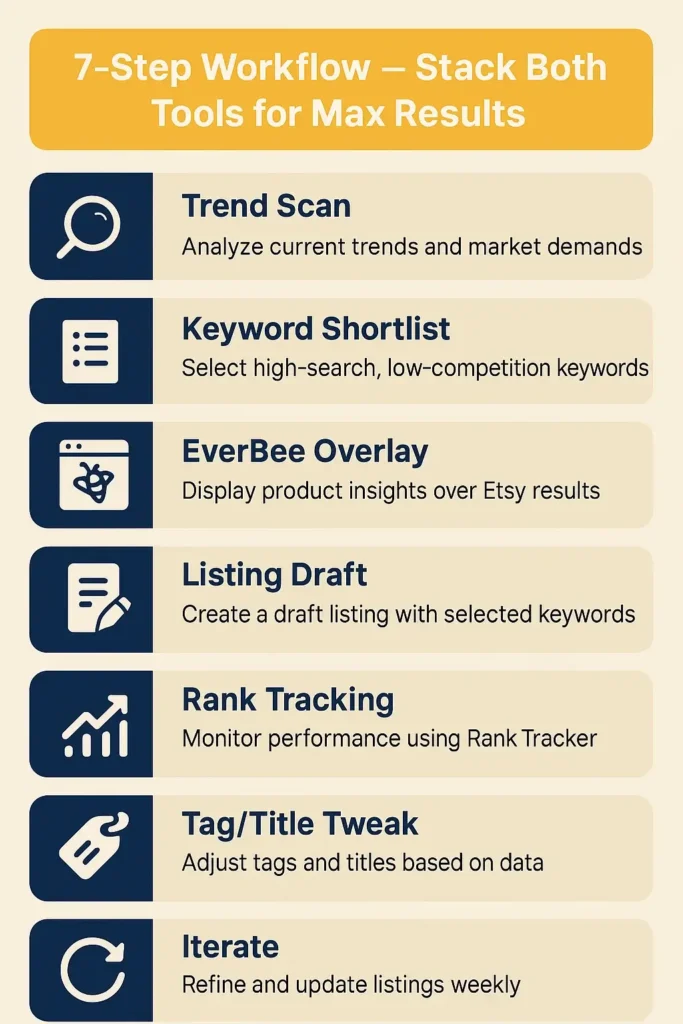
1. Scan Trends (eRank)
Open eRank and check the latest top keywords. Write down any rising trends in your niche. Focus on what buyers search now, not just last month.
2. Build a Keyword Shortlist (eRank)
Search each hot trend or product idea in eRank’s Keyword Tool. Save 5–10 keywords with high search volume and low competition. Export this list.
3. Validate with EverBee Overlay
Open Etsy, run EverBee, and search your shortlisted keywords. Check top listings for estimated monthly sales and revenue. Highlight products selling over 50 units/month.
4. Draft Your Listings
Write your titles using top keywords. Add tags you found in both tools. Set prices and images to match the best-selling competition. Keep your copy clear and buyer-focused.
5. Track Keyword Rankings (eRank)
After publishing, add your main keywords to eRank’s Rank Tracker. Monitor where your listings show up in search over the week.
6. Tweak Tags and Titles
Update weak tags or swap low-performing keywords based on rank shifts and EverBee’s sales data. Aim to improve your search position or click-through rates.
7. Iterate and Repeat
Run this process every week. Double down on what works; drop what doesn’t. Track growth by views, sales, and ranking improvement.
Micro-Case Study:
A new seller used this workflow for seven days. She spotted “wedding menu card” rising in eRank, checked EverBee for products with 100+ monthly sales, and listed her own version. By the end of the week, her listing ranked on the first page and sold 8 units, paying for both tools in one go.
Accuracy & Data Transparency (Sales, Keyword, Ranking)
Good Etsy tools help you spot trends and improve your shop, but no tool shows exact sales or keyword numbers. Here’s how eRank and EverBee handle accuracy and how to use their data with confidence.
How Accurate Are Sales & Revenue Estimates?
EverBee uses smart algorithms to estimate sales and revenue for each listing. These numbers are based on visible product data, shop reviews, and market trends—not from Etsy’s private sales reports. eRank focuses on keyword search volume and trend tracking, not on exact competitor sales.
Reality: Numbers help you compare products or keywords, but don’t take them as exact. Use estimates to spot patterns and decide which listings are worth your effort.
eRank vs Everbee Data Sources & Limits
Both tools use public Etsy data, third-party tracking, and their own algorithms. Search volumes, ranking, and sales are pulled from patterns, not from live Etsy backends. Data may lag by a few days, especially for fast-changing trends.
Best practice:
- Compare products in the same category or niche, not across totally different markets.
- Watch for trends, not single spikes.
- Use sales/revenue numbers as guides for what’s “hot” right now not as promises.
What to Trust, What to Ignore
Trust:
- Relative rankings: If EverBee shows one product selling 10x more than another, you can act on that trend.
- Keyword trends: eRank’s “rising/falling” alerts are useful for picking tags and updating listings.
Ignore:
- Exact sales or revenue numbers.
- Keyword search volume down to the last digit.
- Monthly estimates for new listings (data needs time to catch up).
Smart sellers look for patterns, not perfect numbers. Use eRank and EverBee to find what works, but always watch your own shop stats for final proof.
Alternatives & Competitor Tools (Marmalead, etc.)
Several tools compete with eRank and EverBee. Marmalead and Alura are the top alternatives for Etsy keyword and listing research.
Marmalead focuses on keyword search volume, SEO grades, and real-time trend tracking. Its dashboard gives color-coded grades for titles, tags, and price—simple, but not as deep as eRank for audits or EverBee for in-Etsy sales overlays.
Alura combines product research, keyword tracking, and listing optimization. Its main strength is a clean interface and beginner-friendly tools, but it lacks eRank’s deep SEO audits and EverBee’s direct sales/revenue overlays.
Why Most Sellers Pick eRank or EverBee:
- eRank: Best for ongoing SEO maintenance, large-scale audits, and detailed keyword tracking.
- EverBee: Best for instant product validation and sales estimates right inside Etsy.
- Most sellers use these two because they save the most time and offer the widest features at a lower entry price.
Affiliate/Compliance Note:
Some guides use affiliate links and may receive a commission. Always check each tool’s official site for the latest details. Your shop’s data stays private; these tools connect through Etsy’s secure API and never access your money.
FAQs:
Which tool has more accurate sales data?
EverBee shows sales estimates; accuracy varies. Community reports large disagreement between EverBee & eRank figures.
Can I use both tools together?
Yes. Use EverBee for product validation, and eRank for keyword tracking and listing optimization.
What’s the cheapest setup for new shops?
Start with eRank Pro + EverBee Free. You get keyword tools and basic sales insight without overspending.
Is the EverBee Chrome extension safe?
Yes. It uses Etsy’s public pages and connects securely via OAuth. No password sharing.
What’s better for keyword research?
eRank gives deeper keyword metrics (volume, seasonality). EverBee shows keyword usage of top listings.
How often do the tools update their data?
Updates vary. Keyword and trend data often refresh daily or weekly; sales estimates lag depending on the niche.
Do they support non‑English / EU sellers?
Yes. Both tools support multiple markets and languages (English, Spanish, German, etc.).
Can I cancel after one month?
For eRank, yes, you can cancel anytime, and your account will downgrade to free.
For EverBee, subscription auto‑renews until you request cancellation via support (per Terms).
Action Plan (Your Next Steps)
Ready to choose? Here’s what to do now:
Action List
- Try both tools for 30 days.
Start with eRank Pro and EverBee Free (or Growth if you want full power). - Track 10–20 listings and main keywords.
Monitor your rankings and test new tags every week. - Follow the 7-step workflow.
Use trends, product research, and listing audits to improve results. - Keep only what you use weekly.
Cancel any tool that sits idle for more than 14 days.
Don’t Buy If…
- You won’t update listings at least once per week.
- You expect exact sales numbers (all data is estimated).
- You don’t want to connect your Etsy shop to outside tools.
- You only sell one or two products with no plan to grow.
Pick the setup that fits your workflow and budget. Test, measure, and build the habits that grow real sales.
